
How to turn one video into a week of LinkedIn posts with AI (using free tools)
A step-by-step workflow for turning one recorded video into ten to thirty LinkedIn posts that still sound like you from a transcript, AI-assisted idea extraction, and post drafts, in that order.
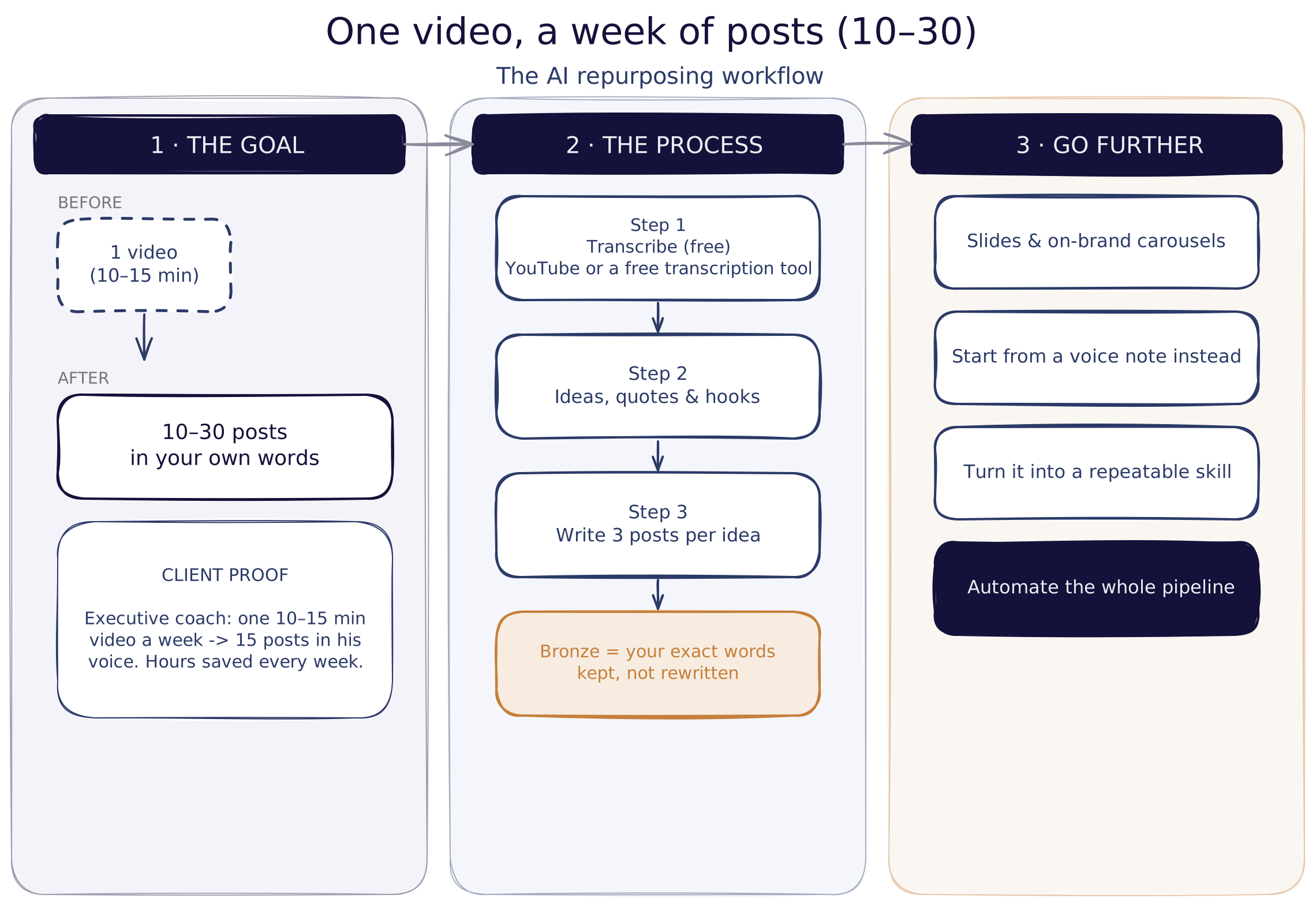
One video edits into ten to thirty LinkedIn posts by running its transcript through a two-step AI prompt: pull out the strongest ideas, quotes, and hooks first, then draft three post variations per idea that reuse your exact wording. Edit lightly, pick the strongest draft, and you have a week, or a month, of content.
Most people record one video a week and get exactly one post out of it. Everything else they said in those ten minutes just disappears. The goal here is to go from one video you make, ten to fifteen minutes, to ten, fifteen, even twenty posts that sound like you, that use your own words, and that can generate more engagement and more leads. Here's the exact workflow, already tested on a real client, that gets you there.
Why turn one video into ten-plus posts instead of one?
Because your audience only ever sees a slice of what you publish. LinkedIn reach for an individual post commonly lands in the 2 to 6% range of your followers, depending on format and account size (industry benchmark data, 2026). So if a step produces more than one strong draft of an idea, use it: post one now and hold another for later, instead of mining a whole new topic every time.
How do you get a clean transcript for free?
You don't need paid tools for this step. Either go straight to YouTube, click Show Transcript at the bottom of the video, and copy it, or use one of the many free YouTube transcription websites: paste your video link, and it hands you the full transcript, downloadable as a plain text file.
How do you extract ideas, quotes and hooks that sound like you?
Now, once you have the transcript, the next step is generating the ideas, the quotes, and the strong hooks that go into the post. What matters most is getting hooked with the first two sentences someone sees in their feed. It's the same for other social platforms too: earn the first two lines, then you get the rest of the read.
The prompt itself is simple. You tell the AI it's a specialized LinkedIn content creator, give it the brand it's writing for, set a few critical rules, and paste in the transcript you just downloaded. Its task: identify the most compelling insights, quotes, and segments, and suggest which type of post each one fits, since there are different types of posts for different purposes: engagement-focused, educational, awareness, or conversion.
The output for each idea includes a point of view, a short description, the exact transcript excerpt the idea came from, and the key quotes worth reusing. Do this once and you'll typically walk away with around ten ideas from a single video.
How do you turn each idea into three ready-to-post drafts?
For each idea, ask the AI for three post variations, not one. Generative AI is non-deterministic, so three drafts of the same idea will differ enough that one lands better than the others. Feed it the same prompt structure: reuse the words you actually said in the transcript, and write toward a proven post structure instead of freestyling.
| Framework | What it does | Use it when |
|---|---|---|
| Before & After | Shows the contrast between the old way and the new result | You have a clear transformation to prove |
| AIDA (Attention, Interest, Desire, Action) | Builds a post in stages toward a specific ask | You want a direct response: a reply, a click, a booked call |
| Problem - Agitation - Solution | Names the pain, makes it felt, then resolves it | The idea centers on a mistake or a common struggle |
Once the drafts come back, read all three. If more than one is strong, don't waste it: use one now and save another for six months from now, since so little of your audience sees any given post the first time around. Repeat this for all ten ideas and you'll land somewhere between ten and thirty posts from one video.
How do you keep the posts in your own words, not generic AI voice?
Here's the part that decides whether it reads like you or like generic AI copy. In the drafts, the words you actually said in the video are marked, set apart from everything the AI generated around them. You keep those marked phrases exactly as they are, drop the markup, and edit only the surrounding sentences, lightly.
Done this way, nobody will know it's AI-generated, because it keeps the authenticity, it keeps the quotes, and it keeps the insights you actually made in the video.
How do you go further:visuals, voice notes, and full automation?
Once the text is working, there's more you can pull from the same ten-minute recording:
- Slides and carousels. With a simple follow-up prompt, and your brand guidelines if you have them, the AI can generate matching images or carousel slides that stick to your brand voice. Without formal guidelines, just ask it to stay professional and consistent with your existing photos; it can decide on its own whether a post needs a carousel or a single image. Claude Design is worth using here since it lets you check and edit the text directly on the slide.
- Start from a voice note instead of a video. If you're out and an idea hits, dictate it into a voice note app, get it transcribed, and run the same prompt on that transcript. Same pipeline, no camera required.
- Turn it into a skill. A skill is something repeatable you set up once with Claude. Ask it to package this whole process into one, and it generates a markdown file you can reuse every time instead of re-explaining the steps.
- Automate the whole thing. This is what we built end-to-end for a client: the video goes in, and the system generates the ideas, the posts, and the on-brand images and carousels automatically, because the brand guidelines were already loaded in. At the end of the week, he records his ten to fifteen minutes, pushes a button, waits about ten minutes, and gets all of his posts back. He edits lightly and schedules straight to LinkedIn.
Watch the full walkthrough
Frequently asked questions
What tool do I actually need to turn a video into LinkedIn posts? Just a transcript and an AI writing assistant. Grab a free transcript from YouTube's built-in transcript option or any free transcription tool, then run it through a two-step prompt: extract ideas and quotes first, then draft posts from each idea in your own words.
How many LinkedIn posts can one video actually produce? A single ten-to-twenty-minute video typically yields ten to thirty posts once you extract several ideas and draft a few variations per idea. Amine's own workflow turned one weekly video into fifteen posts for a past executive-coach client, in his voice, every time.
Will the posts sound like generic AI content? Not if you keep the highlighted phrases from the transcript inside the AI's drafts. The prompt marks the exact words you said so you can carry them, unedited, into the final post. Everything around those phrases gets lightly cleaned up, but your wording stays.
Do I need brand guidelines for this to work? No. Brand guidelines just make the visuals: carousels, images more consistent. Without them, ask the AI to keep a professional tone and match your existing photos or logo. The post-writing step works from the transcript alone, guidelines or not.
Can the whole process be automated? Yes. Once the prompts and brand assets are set up the first time, video-in, posts-out can run as one pipeline: record the video, push a button, wait about ten minutes, and get transcribed ideas, drafted posts, and matching on-brand images, ready to edit lightly and schedule.
What's next
Want the exact prompts from this walkthrough? Grab the full workflow here and run it on your own next recording.